
The full sample is available in my GitHub repository.
Why?
Keeping configuration in Azure Blob Storage can be a very pragmatic choice. In many applications, configuration is just a small JSON file that changes from time to time, so using a dedicated configuration service may simply be more than you need.
Blob Storage is simple, cheap, and efficient. It is often a very good fit when you want a lightweight external configuration source without adding much complexity. Azure App Configuration is a great service, but depending on the scenario and usage, it may be relatively expensive compared to storing a small JSON file in Blob Storage. In many cases, Blob Storage is more than enough and gives you a very nice balance between cost, simplicity, and usefulness.
Assumptions
This sample uses Azure Blob Storage as an external configuration store and authenticates with Azure through TokenCredential. In the demo I use AzureCliCredential, which is a convenient choice for local development, but it is only an example. You can replace it with any other credential supported by Azure Identity.
In cloud environments, Managed Identity is a very common choice for authentication and authorization. It fits this scenario especially well, because the application can access Blob Storage without storing secrets in code or configuration.
To install the required packages quickly, run:
dotnet add package Azure.Identitydotnet add package Azure.Storage.BlobsThe identity used by the application must have permission to read the blob. In practice, assigning the Storage Blob Data Reader role is enough for this scenario.
The implementation is intentionally simple. It reads a JSON configuration file from a blob, checks it every minute, and reloads it only when the blob changes. The change detection is based on the blob ETag, which keeps the refresh lightweight and avoids unnecessary parsing. In the sample the storage details are hardcoded for clarity, but in a real application they can be stored in regular configuration sources such as appsettings.json or environment variables.
Custom blob-backed configuration provider
The core of the solution is a custom configuration provider. It inherits from ConfigurationProvider, which means it integrates directly with the standard .NET configuration pipeline.
public class BlobStorageConfigurationProvider( string account, string container, string blobName, TokenCredential credential, ILogger logger) : ConfigurationProvider, IDisposable{ private static readonly TimeSpan DefaultRefreshInterval = TimeSpan.FromMinutes(1);
private readonly BlobClient _blob = new BlobContainerClient( new Uri($"https://{account}.blob.core.windows.net/{container}"), credential) .GetBlobClient(blobName);
private readonly CancellationTokenSource _cts = new(); private readonly SemaphoreSlim _semaphore = new(1, 1);
private PeriodicTimer? _timer; private Task? _pollTask; private ETag? _etag; private int _pollingStarted; private int _disposed;
public override void Load() { LoadAsync(reload: false, _cts.Token).GetAwaiter().GetResult(); StartPollingOnce(); }
private void StartPollingOnce() { if (Interlocked.Exchange(ref _pollingStarted, 1) != 0) { return; }
_timer = new PeriodicTimer(DefaultRefreshInterval); _pollTask = PollAsync(); }
private async Task PollAsync() { try { while (_timer is not null && await _timer.WaitForNextTickAsync(_cts.Token)) { try { await LoadAsync(reload: true, _cts.Token); } catch (OperationCanceledException) when (_cts.IsCancellationRequested) { break; } catch (Exception ex) { logger.LogWarning( ex, "Failed to refresh configuration from blob '{BlobUri}'." + "Keeping last known good configuration.", _blob.Uri); } } } catch (OperationCanceledException) when (_cts.IsCancellationRequested) { // Expected during shutdown. } }
private async Task LoadAsync(bool reload, CancellationToken ct) { var entered = false; var shouldReload = false;
try { await _semaphore.WaitAsync(ct); entered = true;
var options = new BlobDownloadOptions();
if (_etag is not null) { options.Conditions = new BlobRequestConditions { IfNoneMatch = _etag.Value }; }
var response = await _blob.DownloadContentAsync(options, ct);
if (response.GetRawResponse().Status == 304) { return; // Blob unchanged }
var result = response.Value; await using var stream = result.Content.ToStream(); var config = new ConfigurationBuilder() .AddJsonStream(stream) .Build();
try { var newData = config .AsEnumerable() .Where(x => x.Value is not null) .ToDictionary(x => x.Key, x => x.Value!, StringComparer.OrdinalIgnoreCase);
Data = newData; _etag = result.Details.ETag; shouldReload = reload; } finally { (config as IDisposable)?.Dispose(); } } finally { if (entered) { _semaphore.Release(); } }
if (shouldReload) { OnReload(); } }
public void Dispose() { if (Interlocked.Exchange(ref _disposed, 1) != 0) { return; }
_cts.Cancel(); _timer?.Dispose();
if (_pollTask is not null) { try { _pollTask.GetAwaiter().GetResult(); } catch (OperationCanceledException) when (_cts.IsCancellationRequested) { // Expected during shutdown. } }
_semaphore.Dispose(); _cts.Dispose(); }}This class does the essential work.
It loads the JSON blob during startup, so the configuration is available as soon as the application begins handling requests. After that, it starts a background polling loop that checks the blob every minute.
The refresh is efficient because it uses the blob ETag. If the blob did not change, there is nothing to reload. If it did change, the provider reads the JSON again, converts it into configuration key-value pairs, updates Data, and calls OnReload() so the configuration system knows that values have changed.
A couple of small details make the implementation more robust. SemaphoreSlim prevents overlapping refreshes, and if a refresh fails, the provider keeps the last known good configuration instead of replacing it with a broken state.
Configuration source
The source is the object that plugs the provider into the configuration builder. It is intentionally small, which is exactly what makes it clean.
public sealed class BlobStorageConfigurationSource( string account, string container, string blobName, TokenCredential credential, ILogger logger) : IConfigurationSource{ public IConfigurationProvider Build(IConfigurationBuilder _) => new BlobStorageConfigurationProvider( account, container, blobName, credential, logger);}Its responsibility is simple: collect the required arguments and create the provider. This keeps registration logic separate from provider behavior, which fits very naturally into the .NET configuration model.
A small extension for clean registration
In .NET 10 and C# 14, extension members can be written using the extension block syntax. It is a nice fit here because it keeps the registration API clean and modern while still exposing the same AddBlobJson(...) call on IConfigurationBuilder.
public static class BlobStorageConfigurationExtensions{ extension(IConfigurationBuilder builder) { public IConfigurationBuilder AddBlobJson( string account, string container, string blobName, TokenCredential credential, ILogger logger) => builder.Add(new BlobStorageConfigurationSource( account, container, blobName, credential, logger)); }}This is a small addition, but it makes the final registration code much nicer. The application gets a clean AddBlobJson(...) method instead of dealing with the source type directly.
Program.cs
The demo application registers the provider, creates a simple bootstrap logger, and reads values from configuration in a minimal API endpoint.
using Azure.Identity;using BlobStorageConfigurationProviderSample;
var builder = WebApplication.CreateBuilder(args);
// TODO: replace with your own bootstrap logger var loggerFactory = LoggerFactory.Create(builder =>{ builder .AddConsole() .SetMinimumLevel(LogLevel.Information);});
var logger = loggerFactory.CreateLogger("Bootstrap");
builder.Configuration.AddBlobJson( account: "stbrokuldev", container: "myconfig", blobName: "config.json", credential: new AzureCliCredential(), logger: logger);
var app = builder.Build();
app.MapGet("/", (IConfiguration configuration) =>{ var configSection = configuration.GetSection("BlobConfig");
var config1 = configSection["config1"]; var config2 = configSection["config2"];
return $"config1: {config1}, config2: {config2}";});
app.Run();The registration code is intentionally direct. We point to the storage account, container, and blob, then provide a credential and a logger. In this sample, AzureCliCredential keeps the local setup friendly, but in a cloud-hosted application it is very common to replace it with a Managed Identity-based credential.
The logger is created manually through LoggerFactory because at this stage we are still wiring up configuration and do not yet rely on dependency injection to provide a ready-to-use logger for the provider. In other words, this happens very early in application startup, so creating a small bootstrap logger is a simple way to make logging available immediately.
In many production applications, this role is handled by a dedicated bootstrap logger responsible for logging during startup, before the full application pipeline and service graph are fully built. Here we keep it minimal, but the idea is the same.
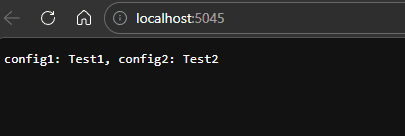
The endpoint itself stays simple on purpose. It reads two values from the BlobConfig section and returns them in the response, which makes the blob-backed refresh easy to observe.
Demo usage
For the demo, I first show the JSON configuration file stored in Azure Blob Storage.
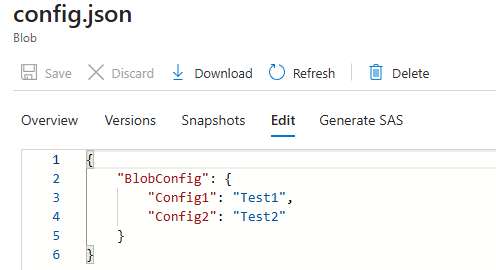
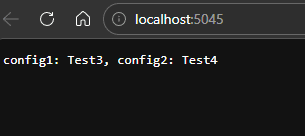
Then I run the application and open the endpoint in the browser. The response shows the current values loaded from the blob.
Next, I update the JSON file in Blob Storage and save the new values.
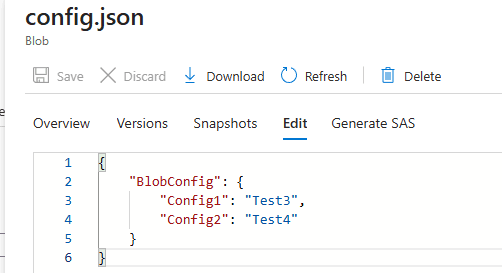
After waiting one minute for the refresh interval to pass, I call the same endpoint again. This time the browser shows the updated values, which confirms that the provider detected the blob change and reloaded the configuration without restarting the application.
Conclusion
This custom provider is a nice example of how flexible the .NET configuration system is. With a relatively small amount of code, we can keep configuration in Azure Blob Storage, load it as standard application settings, and refresh it automatically when the blob changes.
What makes this approach especially attractive is its balance between simplicity and usefulness. It is easy to follow, easy to extend, and already covers the most important concerns: authentication, change detection, safe refresh, and clean integration with the existing configuration pipeline.